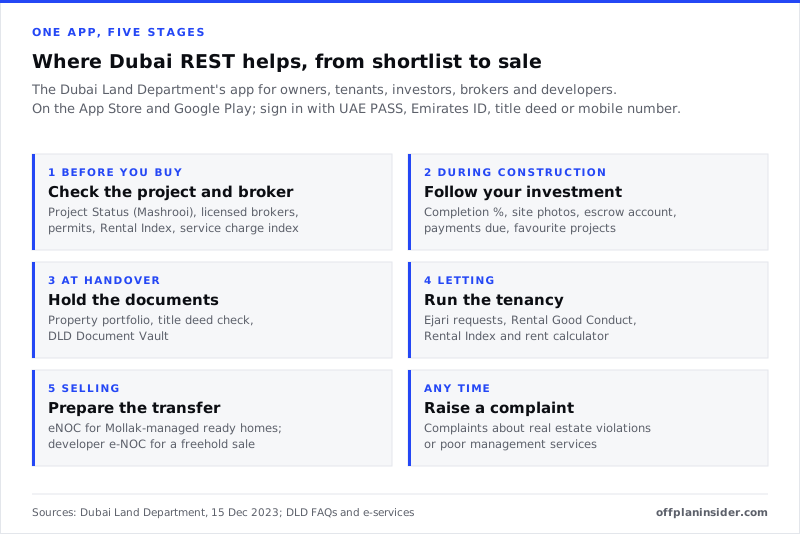
Dubai REST is the Dubai Land Department's official app for property owners, tenants, investors, brokers and developers. Before you buy, it lets you check an off-plan project's registration, completion percentage and escrow bank, a broker's licence and an advert's permit. Once you own, it holds your property portfolio, verifies title deeds, handles Ejari requests, issues eNOC requests for ready homes managed through Mollak, and takes complaints. You sign in with UAE PASS, Emirates ID, your title deed or a mobile number, and it is available on the App Store and Google Play.
Key takeaways
- Dubai REST is the Dubai Land Department's own app. It is free, and it serves owners, tenants, investors, brokers and developers in one place.
- Sign in with UAE PASS, Emirates ID, title deed or mobile number. Foreign investors without Emirates ID sign in with UAE PASS or their title deed.
- Before you buy off-plan, use Project Status (Mashrooi) to see the project number, completion percentage, dates, developer, management company and escrow bank, and match them to your SPA and payment request.
- Owners get a portfolio of their properties, title deed verification and the DLD Document Vault. Owners of off-plan units can follow completion and see payments due on their projects.
- Landlords can register, renew and cancel Ejari, check a tenant's Rental Good Conduct record and the Smart Residential Rent Index. Since 2 November 2026 the full Ejari journey is also on the DubaiNow app.
- To sell a ready home managed through Mollak, request an eNOC in the app. The management company replies in 3 to 5 working days, and it does not replace the developer's NOC.
- Complaints about real estate violations and poor building management services go through the app or the DLD website; contractual disputes do not.
01What is the Dubai REST app?
Dubai REST is the Dubai Land Department's official app for real estate. It puts the department's services for owners, tenants, investors, brokers and developers into one place, on your phone.
The Land Department describes the app as a comprehensive portfolio for property owners, covering buying, selling, renting and mortgaging, with real-time information on off-plan projects. When it upgraded the interface in December 2023, it listed services that run from checking a project before you buy to registering a tenancy after handover.
For an off-plan buyer, the app does two jobs. Before you pay, it is the quickest way to check a project, a developer, a broker and an advert against DLD's own records. After you buy, it is where your ownership, tenancy and building records live.
This guide walks through the app stage by stage. If you want the full checklist for vetting a project before you pay, our guide on how to check an off-plan project and developer covers each check in depth.
02Who is Dubai REST for?
Anyone with a stake in Dubai property. The Land Department names property owners, tenants, real estate brokers, developers, residents, investors and other stakeholders as its users.
| If you are | You will mostly use |
|---|---|
| Choosing an off-plan home | Project Status (Mashrooi), licensed broker search, licence and permit verification, Rental Index, service charge index |
| An off-plan owner during construction | Your portfolio, completion percentage and photos, escrow details, payments due, project updates |
| A first-time buyer | First-Time Home Buyer Programme registration |
| An owner of a ready home | Portfolio, title deed verification, DLD Document Vault, service charge index, complaints |
| A landlord | Ejari requests, Rental Good Conduct, Smart Residential Rent Index, Rental Calculator |
| A seller | eNOC request, developer e-NOC, transaction updates |
| A tenant | Ejari requests, Rental Index, Rental Good Conduct |
03How do you download and sign in to Dubai REST?
Download it from the App Store or Google Play, then sign in with UAE PASS, your Emirates ID, your title deed or your mobile number.
Where to get it. The app is published by the Dubai Land Department. It is free on the App Store, where it is listed for iPhone, iPad and Apple silicon Macs. The Land Department's Project Status page links to both the App Store and Google Play and gives a QR code to download it.
Signing in. The Land Department's eNOC guide lists four ways to log in: Emirates ID, title deed, mobile number and UAE PASS. Its answers on tenancy services also mention the Emirates ID number, title deed and phone number.
If you live abroad. The app's release notes say login for foreign investors is limited to UAE PASS and the title deed. In practice that means an overseas buyer can sign in with the title deed details once the purchase is registered. Public services such as Project Status and the Rental Index are also on the DLD website, so you can check a project before you own anything.
Keep your details up to date. Many requests are confirmed by email or by a one-time password to your mobile. Make sure the email address and phone number on your DLD records are current, especially if you live abroad.
04What can you check before you buy off-plan?
The most useful pre-purchase service is Project Status, also called Mashrooi. Add the broker search, licence and permit checks and the rent and service charge indices, and you can test most of a sales pitch against DLD's own records.
Project Status (Mashrooi)
Open Project Status from the home screen or the services menu and search by project name or number. The same service is on the Land Department website as the Project Status Enquiry.
Each project record shows:
- the project number, area in square metres and number of units;
- registration, start and completion dates;
- the property location, remarks and the date comments were last updated;
- building and developer details, including the developer's name and status;
- the management company's contact details; and
- the escrow account bank.
The record also links to a fact sheet and inspection details, and lets you follow a project so its updates appear in your app.
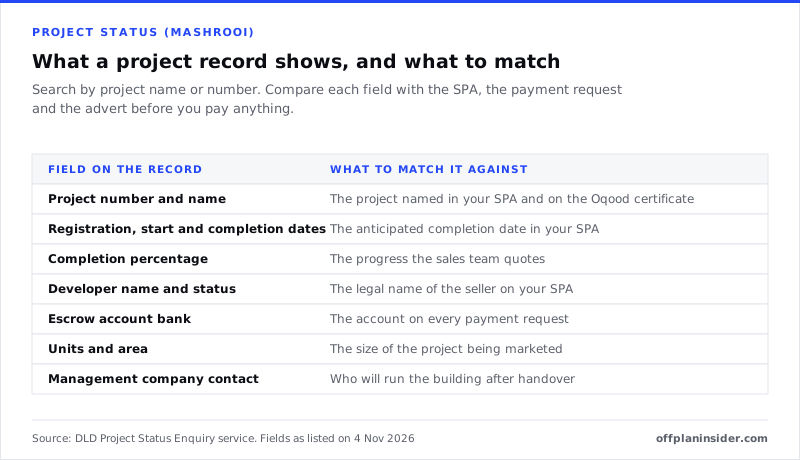
What to do with it. The point is to match. The project on the record should be the project in your sale and purchase agreement (SPA). The developer should be the seller. The escrow bank should be the bank on every payment request. If any of them differs, stop and ask in writing.
If you cannot find the project. Search by the project number on the developer's paperwork rather than the marketing name, which can differ. A project that is being launched should have a DLD project number; ask for it. Projects we list as new launches show the developer and area so you can search for them.
Brokers, licences and permits
- Licensed brokers. The app's Real Estate Brokers service lists licensed brokers and offices. Ask for the broker's card number and check the name and office match.
- Licences and permits. The app verifies real estate licences and permits, including the advertising permits that genuine property adverts carry.
Our guide to real estate agents and commission on off-plan explains what an agent must have in place and how they are paid.
Rents and service charges
- Rental Index. The Smart Residential Rent Index, which DLD says relies on building classifications, can be checked in the app or on the website. It is a guide to market rent for a building or area.
- Service charge index. The service fee indicator shows approved service charges by project, which is the clearest guide to a building's running costs.
Use both before you rely on any rent or running cost figure for a home you plan to let. The wider costs of owning are in our guide to the true cost of buying off-plan.
First-Time Home Buyer Programme
UAE residents aged 18 or over who do not own freehold residential property in Dubai, and are buying a home under AED 5 million, can register for the Land Department's First-Time Home Buyer Programme on the DLD website or in Dubai REST. Eligible buyers receive a QR code by email to use with participating developers and banks. One benefit is paying DLD registration fees in interest-free instalments through eligible credit cards; our guide to the DLD fee explains the fee itself.
05How does the app help while your home is being built?
It lets you follow your own project rather than waiting for updates. The Land Department says owners can see completion percentages, project photos, escrow account numbers and payments due for the projects they have invested in.
- Completion percentage. The certified progress of the building, from DLD's inspections.
- Project photos. Images from the site, so you can see progress for yourself.
- Escrow account. The account your instalments should be paid into. Check every payment request against it.
- Payments due. What is owed on your unit, alongside your payment plan.
- Favourite projects. Follow projects you are considering, as well as the one you own.
If the project stalls. The app lists a service for the Incomplete and Cancelled Projects Committee, the body that deals with projects that are not completed. Our guide to off-plan buyer protection explains what the law provides if a project is delayed or cancelled.
Compare with the SPA. If the completion percentage is far behind the anticipated completion date in your contract, ask the developer for a revised date in writing. The grace periods and remedies are in our guide to the handover process. Projects close to completion are listed under near handover.
06What does the app do once you own the home?
It becomes your property file. The Land Department describes a portfolio for managing properties, including buying, selling, renting and mortgaging, along with title deed checks and a secure document store.
Your portfolio. Each property you own in Dubai, with its details and services, in one list.
Title deed verification. The app verifies title deed certificates against DLD's register. Use it on any deed you are shown, for example when buying a resale home, and on your own once it is issued.
DLD Document Vault. A secure digital store for property documents, which can be shared from the app.
Service charges. Approved service charges are invoiced through the Mollak system and paid into accounts approved by RERA; DLD lists Noqodi as one way to pay. The service charge index in the app shows the approved rate for your project.
Updates. The app sends updates on real estate transactions linked to your properties.
07How do landlords use Dubai REST?
For tenancies. Landlords and tenants can submit Ejari requests in the app, check a tenant's rental record and look up the rent index before setting the rent.
Ejari in the app
The Land Department says the app helps tenants and landlords submit Ejari management requests: registration, renewal and cancellation. In its answers:
- a tenant can submit the details of the rental agreement in the app;
- if a tenant asks to cancel the Ejari, an approval request goes to the owner;
- the Ejari certificate can be downloaded from the app or the website; and
- the status of a contract can be checked in the app or on the DLD website.
The DubaiNow route. On 2 November 2026 the Land Department moved the full tenancy contract journey onto the DubaiNow app as well. Landlords and tenants can create, register, renew and cancel a lease there, and the DEWA security deposit is paid in the same process. Both parties sign in with UAE PASS. Use whichever app suits you; the registration is the same.
Checking a tenant, and the rent
- Rental Good Conduct. A query on the rental record of a tenant or landlord, by Emirates ID number, on the website and in the app. It shows whether there is a history of rental cases.
- Rental Index and Rental Calculator. Check the index rent for your building and use the calculator for average rents and permitted increases before you agree or renew a rent.
Short-term letting is different. Holiday homes are licensed by Dubai's Department of Economy and Tourism and are not registered on Ejari. Check the building's rules and the licence before you plan short stays.
08How do you sell using Dubai REST?
The app is where the paperwork starts. For a ready home managed through Mollak, you request an eNOC in the app. In freehold areas, the developer's e-NOC is also obtained through Dubai REST before the transfer is registered.
The eNOC. The Land Department's guide says the eNOC service is for ready properties managed by owners' association management companies, where the owner receives service charge invoices from Mollak. The management company processes the request in 3 to 5 working days and replies by email with approval and a validity date, or a rejection with reasons. You can resubmit once the reasons are dealt with.
It is not a substitute for the developer's NOC. The management company may contact the developer if needed.
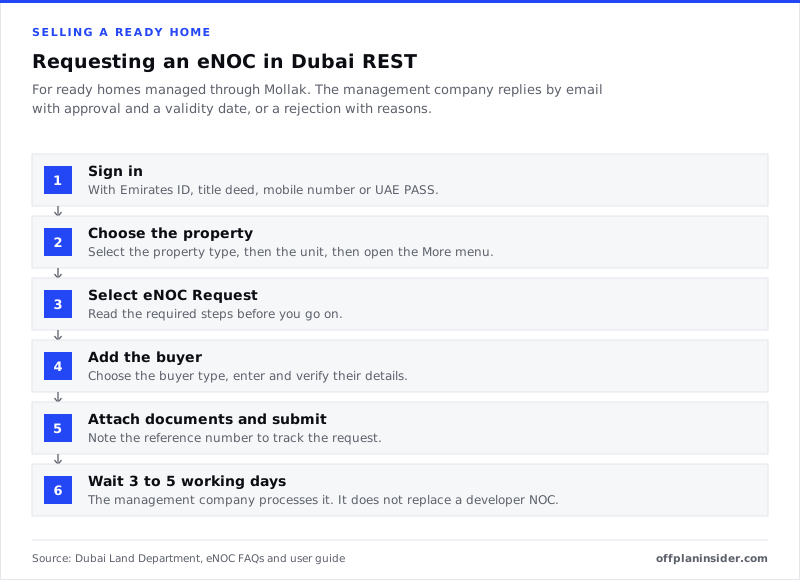
If you do not have a Dubai REST login, the Land Department says you can apply for the eNOC through the management company's own channel.
Registering the sale. The transfer itself is completed at a Real Estate Registration Trustee centre, where the buyer and seller pay the registration fees. The Land Department's sale registration page lists a developer e-NOC for freehold areas, obtained through the Dubai REST app, among the documents. What the buyer and seller pay is set out in our guide to the DLD fee.
Selling before handover is an assignment, which runs through the developer and the Oqood register rather than the eNOC. See our guide to selling off-plan before handover.
09How do you make a complaint through Dubai REST?
Through the complaints service in the app or on the DLD website. It is for real estate violations, not for contractual claims.
The Land Department's answers say a complaint can be registered in the Dubai REST app or on its website, and must concern a real estate violation. Unit owners can also complain through the app about low levels of service or maintenance in their building.
What is outside it:
- Contract disputes with a developer or a buyer, such as a claim for compensation, go to the courts or the appropriate dispute body.
- Rental disputes between landlord and tenant go to the Rental Disputes Centre.
- Dubai government services in general can be raised through the Dubai government's complaints portal.
Keep your reference number, and attach photographs, contracts and correspondence to the complaint.
10Dubai REST, DubaiNow, Oqood and Mollak: what is the difference?
They are separate systems, and you will meet all four as an off-plan owner.
| System | Run by | What it is for | Who uses it |
|---|---|---|---|
| Dubai REST | Dubai Land Department | The department's app for checks, ownership records, tenancy, eNOC and complaints | Owners, tenants, investors, brokers, developers |
| DubaiNow | Dubai government | Services from many government bodies, including the full Ejari journey and property sale registration | Residents and businesses |
| Oqood | Dubai Land Department | The interim register for off-plan sales, and the portal developers use to register them | Developers; buyers receive the Oqood certificate |
| Mollak | Dubai Land Department (RERA) | Service charge budgets, invoices and payments for jointly owned buildings | Management companies and owners |
In Abu Dhabi none of these apply. Property there is registered through the Abu Dhabi Real Estate Centre and its own digital services; see our guide to buying property in Abu Dhabi as a foreigner.
11Other services listed in the app
The Land Department lists several more services in the app. Explore them once you are signed in:
- Smart Investment Map.
- Training courses and exams.
- Green List.
- Ask Malik.
- Property status enquiry, by area and land number.
12Tips for using the app
- Use the project number. Searching by number avoids confusion between marketing names and registered names.
- Screenshot what you check. Keep a dated record of the project record and escrow bank when you pay each instalment.
- Keep contact details current. Approvals and one-time passwords go to the email and mobile on your record.
- Try the website if the app fails. Project Status, the Rental Index and Ejari are also on the DLD website.
- Update the app. Services and menus change between versions, and older versions may stop working.
- Never pay through a link someone sends you. Pay instalments into the escrow account shown on the project record, and DLD fees only through the channels DLD lists.
13Where to go next
If you are still choosing, start with our step-by-step guide to buying off-plan and the project and developer checks, then browse all projects and search each one in Dubai REST before you reserve. If you already own, the handover guide covers what comes next, and our guide to EIBOR explains how a mortgage at handover is priced.
FAQQuestions buyers ask.
What is the Dubai REST app?
Dubai REST is the Dubai Land Department's official real estate app. It brings DLD and RERA services for owners, tenants, investors, brokers and developers into one place: checking projects and brokers, managing a property portfolio, verifying title deeds, Ejari tenancy requests, rent index checks, eNOC requests, first-time buyer registration and complaints.
How do I log in to Dubai REST?
Download the app and sign in with UAE PASS, your Emirates ID, your title deed or your mobile number. The Dubai Land Department's eNOC guide lists all four options. The app's release notes say foreign investors sign in with UAE PASS or their title deed, so an overseas owner can use the title deed details once the purchase is registered.
Can I use Dubai REST from outside the UAE?
Yes. The app is on the App Store and Google Play, and an overseas owner can sign in with UAE PASS or the title deed. Many services, such as Project Status and the Rental Index, are also on the Dubai Land Department website. DLD says owners abroad can use the app for tenancy matters as long as their contact details are up to date.
How do I check an off-plan project on Dubai REST?
Open Project Status (Mashrooi) from the home screen or the services menu and search by project name or number. The record shows the project number, area, units, registration, start and completion dates, the completion percentage, the developer, the management company and the escrow account bank. Match each one to your SPA and every payment request before you pay.
Can I verify a title deed on Dubai REST?
Yes. Verification of title deed certificates is one of the services the Dubai Land Department lists in the app. It is a useful check before you buy a resale home or accept a property as security, because it confirms the deed against DLD's own register rather than a copy you have been sent.
Can I register Ejari on the Dubai REST app?
Yes. DLD says the app handles Ejari registration, renewal and cancellation, and the certificate can be downloaded from the app or the website. If a tenant asks to cancel, an approval request goes to the owner. Since 2 November 2026 the whole tenancy journey, including the DEWA deposit, is also available on the DubaiNow app.
What is an eNOC on Dubai REST?
An electronic no objection certificate for selling a ready home whose building is managed through the Mollak system. You request it in the app, the management company processes it in 3 to 5 working days, and you receive approval with a validity date, or a rejection with reasons, by email. It does not replace the developer's own NOC.
Is Dubai REST the same as DubaiNow?
No. Dubai REST is the Dubai Land Department's real estate app. DubaiNow is the Dubai government's app for services from many departments, such as bills, fines and permits. Some DLD services, including the full Ejari tenancy journey since November 2026 and property sale registration, can be reached through DubaiNow as well.
Sources & methodWhere these figures come from.
Sources
- Dubai Land Department: Dubai land department enhances dubai rest real estate services via improved interactive interface
- apps.apple.com: Id1437805105
- Dubai Land Department: Real estate project status
- Dubai Land Department: Electronic no objection certification enoc _eng.pdf
- Dubai Land Department: Property sale registration
- Dubai Land Department: First time home buyer overview
- Dubai Land Department: Frequently asked questions
- Dubai Land Department: Register renew terminate tenancy contract
- Gulf News: Dubai tenants can now register renew cancel ejari pay dewa on dubainow app
What we could not verify
- Menu names, login options and the place of each service inside the app change between versions; the guide names services as the Dubai Land Department lists them, not exact screens, and the app on your phone may differ.
- Whether a non-resident who has not yet bought can sign in and use the full app could not be confirmed; the app's release notes say foreign investors sign in with UAE PASS or a title deed, and Project Status and the Rental Index are also on the DLD website.
- Whether the app is free on Google Play was not confirmed, because the Google Play listing would not open on 4 November 2026; it is free on the App Store, and DLD's Project Status page links to both stores.
4 Nov 2026 · Reviewed by OffPlan Insider Research. First published 4 Nov 2026.